Version 2.0o

Boost your productivity in Windows

A suite of lightweight utilities designed to supercharge your daily workflow, built with AutoHotkey v2 and native Windows APIs, engineered with Google Antigravity & Gemini.

GTools Quick Context Menu

🚀 Currently in active development. Send your suggestions to hola@guillermo.com.ar

Key Features

🖥️

Show Desktop Pro: Your instant blank canvas

Forget the inconsistency of standard Windows toggle desktop. GTools features a robust proprietary window-minimizing engine that delivers outstanding speed and total reliability.

💾

Workspace Manager

Save and restore the exact layout and position of all active windows with a single click. Seamlessly switch between work sessions without losing your order.

📐

Hot Corners

Trigger screen actions in a snap. Move your mouse to the top-right corner to open Task View, or the bottom-right to minimize all windows instantly.

☕

Caffeine Mode

Keep your PC awake during presentations or long tasks. Set quick sleep-prevention timers for 30 minutes, 1, 2, 4, 8, 16 hours, or indefinitely.

🖱️

Quick Context Menu

Hold down the Middle Mouse Button (0.5s) to launch a handy utility overlay: take screenshots, extract text, grab colors, launch apps, and manage audio.

🔍

Instant UWP OCR

Extract uncopyable text from images, PDFs, or videos instantly with `Win + Shift + T`. Powered by ultra-fast native Windows OCR engine.

📝

Global Search & Replace

Search and replace text massively across multiple files inside a directory. Supports Case Sensitivity, Whole Words, Regex patterns, and automated local backups.

✏️

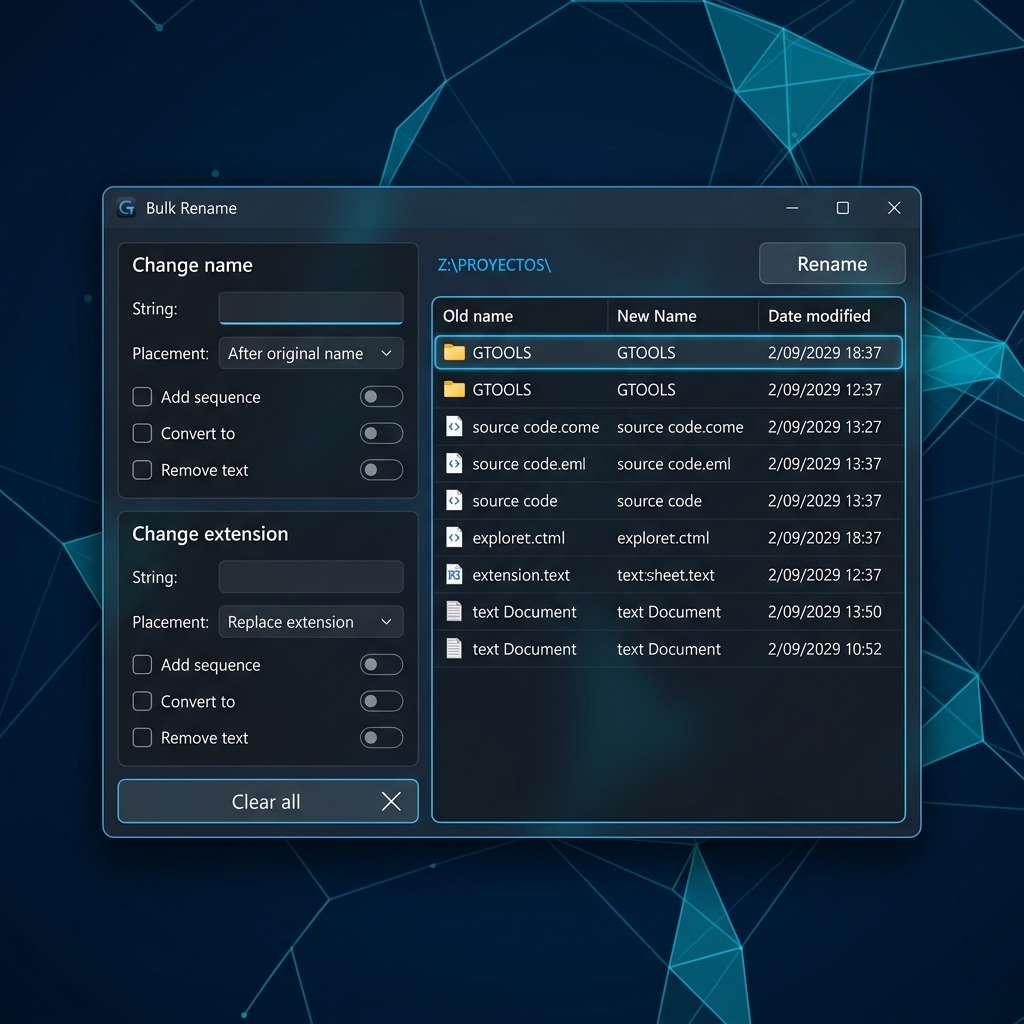
Bulk Rename

Rename multiple files or folders in batch with simple patterns. Now also works directly on the active folder window if no items are selected.

📷

Clipboard Image Paste

Copy a screenshot to the clipboard and paste it as a PNG file directly into any folder from the context menu. Filename is auto-generated with a localized prefix and timestamp.

📋

Clipboard History

Press 'Win + Shift + V' to open a lightweight clipboard manager. Stores up to 30 items: Text, Hex Colors, and Screenshots with proportional preview thumbnails.

🖼️

Batch Image to JPG

Select multiple images (PNG, BMP, GIF, TIFF, WebP, ICO, AVIF, HEIC) in Explorer and convert them all to optimized JPG with 90% quality in a single click.

🎨

Color Picker

Grab color codes from any pixel on your screen with `Win + Shift + C`. Features a dynamic visual magnifying swatch and copies HEX codes straight to the clipboard.

🎯

Cursor Finder

Never lose track of your mouse pointer. Double-tap the `Control` key to trigger a beautiful visual ring flash around the cursor.

🔲

Window Transparency

Adjust the opacity of any window from the context menu. Choose between 6 preset levels (100% to 30%) to see through windows while working.

🔄

Reboot to UEFI/BIOS

Skip key-mashing at startup. Safely reboot your computer directly into your motherboard's UEFI/BIOS configuration panel from the system tray.

Active Path Copy: Copy single/multiple file paths or active folder path directly from the context menu.

Recycle Bin Cleaner: Safely empty your Recycle Bin with one click and free up disk space instantly.

Root Shortcuts: Open PowerShell or Command Prompt with full administrative privileges in a second.

Run on Startup: Option to have GTools load automatically on Windows startup for an uninterrupted experience.

Hot-Swappable Languages: Seamlessly switch the entire application interface between English and Spanish on the fly.

Release Notes

v2.0o Latest
October 29, 2026
  • Update & Maintenance Pipeline: Core improvements to background synchronization and seamless silent update delivery.
  • Graphics & Event Engine: High-performance low-level GDI+ graphic API pipeline and ultra-low latency event dispatching.
  • Enhanced Stability: Refined background lifecycle handling, memory efficiency, and trusted digital signature.
v2.0h
October 16, 2026
  • Sound Keys in Games: Volume controls (F10/F11/F12) and AltGr multimedia shortcuts are now exempt from game suspension, keeping them fully active and responsive in fullscreen games.
v2.0g
October 11, 2026
  • Direct Volume Controls: F10 lowers volume, F11 raises volume, and F12 mutes audio. Native F10, F11, and F12 remain accessible via AltGr + F10/F11/F12.
  • Shake to Locate Cursor: Replaced double-Ctrl trigger with natural cursor shake detection, featuring a lag-free spotlight optimized across multi-monitor setups.
  • High-Definition Startup Splash: Displays the 3D logo in the center of the primary screen with smooth GDI+ bicubic fade in/out animations.
v2.0f
October 10, 2026
  • Persistent Suspension Indicator: The "Avoid Sleep" (Caffeine) notification now stays visible on screen without auto-dismissing and updates continuously every minute.
  • Dynamic Localization: Changing system language in GTools instantly translates the active suspension notification on the fly.
  • Polished UI Layout: Symmetrical margins and snug borders for floating notifications, eliminating text clipping and irregular spacing.
v2.0e
September 27, 2026
  • New Mouse Gestures: Hold Right Alt + Right Click to control media (Up/Down for volume, Left/Right for Play/Next). Hold Ctrl + Right Click for quick clipboard actions (Left/Right for Copy/Cut, Down for Paste, Up for Screenshot).
  • Keyboard Media Controls: Use Right Alt + F6-F12 for media playback and volume control directly from the keyboard.
  • PowerToys Style Cursor Locator: The double-Ctrl cursor locator now features a full-screen dimmed overlay with a precise zooming spotlight.
  • Fullscreen Pause Fix: Corrected a bug where fullscreen exclusion ignored the user's toggle setting, restoring functionality when playing games or watching videos if desired.
v2.0d
September 23, 2026
  • Mouse Gestures Navigation: Hold Right Click and drag: Drag Down to show/hide desktop, Drag Up for Task View (Win+Tab), Drag Left/Right to switch virtual desktops. Completely prevents native context menu popups during gestures.
  • Triggers Toggle Support: Turn Mouse Gestures on or off on the fly via the Menu Triggers sub-menu.
  • Window Tools Consistency: Window tools (Always on Top, Transparency) are now reliably detected on any part of a window, including child controls and text editors.
  • Tray Icon & Language Fixes: Runtime icon enforcement guarantees the GTools logo in the notification area, and clean installs default to English.
  • Performance Hardening: Optimized polling frequencies and non-blocking registry updates for minimal resource usage.
v2.0c
September 3, 2026
  • "Window" & "Tools" Submenus: Context menu reorganized into dedicated submenus with color icons for a cleaner, more compact layout (Always on Top, Transparency, Bulk Rename, Copy Path, Search & Replace, Convert to JPG).
  • Reliable File Selection Capture: Fixed Explorer and Desktop file selection detection so context menu tools reliably capture selected file paths or active folder path.
  • Clipboard History Repositioned: Moved Clipboard History directly above Screenshot for quicker access.
  • Always-on-Top Z-Order Fix: Menus and submenus now reliably display on top of windows marked as always on top.
  • Smart Double Right Click: Physical suppression of the second right click and automatic Windows context menu dismissal to avoid menu overlapping.
  • Enhanced Color Picker: Instant cancellation via secondary mouse button or Escape without lingering menus, and direct hardware state detection for primary click selection.
  • Native WebP to JPG Engine: Integrated official Google WebP decoder to effortlessly convert `.webp` images to `.jpg` format directly from the context menu, with clean white background on transparent areas and batch folder conversion support.
  • Modern Windows 11 Notepad & Stability Hardening: Prioritizes tabbed UWP Notepad, configurable fullscreen pause toggle, safe game detection, atomic file saving in Search & Replace, duplicate protection in Bulk Rename, and complete GDI+ lifecycle stability.
v1.9c
June 22, 2026
  • Mouse Shortcuts Refinement: Removed the `Ctrl + Left Click` trigger to prevent interference with multiple file selection in Explorer.
  • Tinkercad Rotation Fix: Rebuilt the `Double Right Click` trigger with native mouse passthrough and smart drag detection (avoiding blocking cameras or opening Windows context menus).
  • Automatic Game Suspension: Dynamically suspends all hotkeys and active hot corners whenever a full-screen game or presentation is running in the foreground.
v1.9b
June 12, 2026
  • New Menu Triggers: Integrated global `Ctrl + Left Click` and `Double Right Click` triggers (using custom delta-time logic to block secondary native context menus).
  • Shortcuts Config Submenu: Added a "Menu triggers" option in the tray menu to toggle each shortcut individually with persistent settings.
  • Explorer Path Terminal Fix: Resolved a directory resolution issue when opening CMD/PowerShell from virtual folders (such as *This PC*) by validating physical paths via `DirExist` and defaulting to `C:\`.
  • Submenu Close Hover Delay: Implemented a **400ms** delay (hysteresis) before closing active submenus on pointer exit or crossing other items, preventing accidental closure.
v1.9a
June 6, 2026
  • DPI-Aware Custom Menus: Custom context menus and submenus now automatically and dynamically scale their widths, heights, margins, font render sizes, checkmarks, arrows, and borders based on the active monitor's DPI settings, ensuring zero text cutoff on scaled displays (>100%).
  • Optimized Menu Widths: Reduced base layout widths of modern menus (tray down to 240px and desktop context menu to 200px) to eliminate empty right-hand margins and fit text content tightly.
  • High-Contrast Color Picker Border: Added nested black and white borders around the Color Picker magnifying swatch to prevent it from getting lost against purely white or black backgrounds.
  • Classic Menu Toggle: Added a tray icon option to alternate between the modern owner-drawn GUI menu and the standard Windows native menu style at runtime. While in classic mode, left-clicking the tray icon now programmatically opens the native menu.
v1.8p
June 2, 2026
  • Modern Windows 11 GUI Engine: Migrated all application context menus (tray and desktop Middle Click) to a customized modern Fluent-style interface matching Windows 11 design guidelines, complete with refined spacing, rounded borders, a dark mode system, and smooth fade-in animations.
  • Optimized Hover Delays: Tweaked mouse hover behavior for all context submenus to trigger at 200ms for a more fluid navigation experience.
  • Seamless Background Auto-Updates: Standardized installation and updates using the `/SILENT` command flag, allowing GTools to automatically close, update, and restart seamlessly without interrupting your workflow.
v1.8n
May 29, 2026
  • Advanced Clipboard History: A premium, lightweight replacement for the default Windows clipboard manager. Keeps an in-memory history of up to 30 items, intelligently classifying text, hexadecimal colors (with instant visual swatches and RGB conversions), and screenshots (stored securely as high-quality PNGs via native GDI+ calls). Supports real-time dynamic search, automatic pegado with a double-click shortcut (`Win + Shift + V`), active update on new copies, and automatic cleanup at startup to preserve privacy and optimize disk space.
v1.8m
May 25, 2026
  • Hot Corners Multi-Monitor Stability: Fixed a crash when monitors are temporarily unavailable during startup or wake-from-sleep. The hot corners engine now gracefully handles invalid monitor indices, automatically recovering when displays reconnect.
v1.8l
May 21, 2026
  • Full UI Internationalization: The Bulk Rename and Search & Replace windows are now fully translated across all 4 supported languages (English, Spanish, French, Portuguese), including all labels, buttons, options, tooltips, error messages, and confirmation dialogs.
  • Clipboard Image Paste: New context menu option to save a screenshot from the clipboard directly as a PNG file into the active folder. The filename is auto-generated with a localized prefix and timestamp.
  • Batch Image to JPG Converter: Select one or more images (PNG, BMP, GIF, TIFF, WebP, ICO, AVIF, HEIC) in Explorer and convert them all to JPG with 90% quality in a single click from the context menu.
  • Parameterized Translation Engine: Added TF() function supporting placeholder-based translations ({1}, {2}...) for dynamic messages with variable content like file counts and error details.
  • Window Transparency Control: New submenu in the context menu to adjust the opacity of any window. Six preset levels (100%, 90%, 80%, 70%, 50%, 30%) with visual check indicator for the current level.
v1.8k
May 21, 2026
  • Complete Redesign of Global Search & Replace: Rebuilt Find & Replace from the ground up featuring an ultra-premium dual-column layout, left-aligned action sidebar, advanced scan options (Case Sensitive, Whole Word, Regex, Subfolders), local backup in `fmt_bak`, real-time stats, and support for selective line replacements.
  • Intelligent Copy Path Integration: Added smart 'Copy Path' to the context menu, automatically copying single/multiple selected file paths or the active folder path when no items are selected.
  • Bulk Rename Alignment: Bulk Rename now uses the same dynamic fallback engine, allowing you to instantly rename the active open folder if no files inside are selected.
  • Quick Context Menu Clean & Fixes: Removed 'Mute Audio' for a cleaner layout and resolved a critical AHK v2 runtime error related to ComboBox `.Length` properties.
  • Automated Backup Safety Engine: Integrated an automatic, non-intrusive local file backup mechanism in the source directories for secure regex executions.
v1.8j
May 20, 2026
  • Cursor Finder Visual Polish: Localization rings now render with an elegant, higher-contrast semi-transparent black border, ensuring perfect visibility on both extremely bright and dark backgrounds without any pixelation or performance impact.
  • Network Paths & CLI Fixes: Fully resolved the execution permissions on local mapped drives and shared network directories within the PowerShell/Command Prompt terminal backend.

If GTools makes your day easier, your support helps keep the project alive and expanding with new features.

Mercado Pago PayPal PayPal